Navigate the GenAI Hype by Mapping Everything Back to Prompting

TL;DR
You're not too late to learn how to apply GenAI — in fact, if you understand how to prompt ChatGPT, you already grasp the core concept behind nearly every GenAI buzzword (like RAG, agents, and workflows).
Everything maps back to two fundamentals:
- Context (information you provide to help the model understand what you want — facts, examples, background, constraints).
- Steps (instructions or process you want the model or system to follow — reasoning, actions, outputs)
Key takeaways:
- Prompting is the core skill; everything else (agents, memory, workflows, evaluation) builds on it.
- LLMs don't know anything — they just follow patterns.
- Evaluation is hard because LLMs can be brilliant or dumb unpredictably.
- Tools and function calls come from the system around the LLM, not the model itself.
- True learning comes from doing — prompting, testing, building.
Bottom line: Learn to prompt well, create your own feedback loop by prompting LLMs to teach you more, and you'll understand GenAI faster than you think.
What is GenAI?
- Generative AI (GenAI): AI that creates new content — text, images, code, audio, video.
- LLMs (Large Language Models): Text-focused foundation models like ChatGPT, Claude, Gemini. Understanding LLMs is the fastest way to build intuition across all GenAI.
- Foundation Models: Big, pretrained models you can use directly.
Why LLMs Work (Claude Shannon Edition)
LLMs work because language follows patterns, and Claude Shannon's information theory showed us that communication has measurable structure and predictability. Today's LLMs exploit this by predicting the next word across billions of examples with far more context than ever before.
If Shannon's work was like measuring the predictability in one book, LLMs are doing it across all books, websites, and conversations on the internet — one token at a time.
When you type "The cat sat on the..." the model isn't just remembering that phrase—it's weighing thousands of patterns about cats, furniture, prepositions, and sentence structure to predict "mat" is more likely than "elephant."
It's not magic. It's statistics at scale. Yes, there are discussions around LLMs being sophisticated pattern matchers that exhibit emergent behaviors we don't fully understand. But remembering they're fundamentally predictive helps us work with their strengths and limitations.
The Core Insight That Helps You Understand Everything
- Every conversation with an LLM is a single long string of text the model uses to calculate the next word.
- LLMs are statistical pattern matchers — they don't "understand," they predict the most likely next word.
- It's math that often feels like magic. Remembering it's just statistical prediction helps you understand both the power and the limits.
Core Principles to Understanding GenAI
1. Prompts
You're already familiar with these from ChatGPT. If not, go experiment first.
2. Conversations are just long text
A "conversation" is your prompt + the LLM's reply + your response + back and forth. But here's the key: to the LLM, this isn't a conversation—it's one massive piece of text.
3. Better conversations = better context and/or better/additional steps
You improve your results by either:
- Adding more relevant context to your text
- Have the LLM jump through hoops in a series of steps
4. It's all statistical prediction
LLMs predict the next word based on patterns. Give it "The cat sat" and it uses those three words as context. After an hour-long ChatGPT conversation, that context might be thousands of words long—but it's still just calculating the most likely next word.
5. Every buzzword maps back to these basics
- RAG = adding context
- Chain of thought = adding steps
- Agents = systematic combinations of context and steps
Prompting is the Core Skill
Prompt Engineering
- Crafting prompts to guide the LLM to do what you want. It's like giving context and detailed instructions (steps) to a very capable but literal assistant. It's also where almost everyone moves after spending a lot of time with LLM chats.
Context Engineering (industrial version of prompting)
- While you may manually string together the output of many prompts or add additional context to a conversation to arrive at a desired result, Context Engineering is doing that in a systematic way so it is more repeatable.
- Design systems that feed the right information and tools in the right format at the right time so the LLM can accomplish the task (The rise of "context engineering")
Systems Around the LLM
We rarely use raw LLMs. Most of the time, we interact with them through systems:
- Raw Model – Via API or local install. Limited context and no external tools. Ask about recent events and the model will respond that it was only trained up to 2023 and therefore cannot respond appropriately.
- Foundation Model Online – ChatGPT or Claude in a browser. May include tools like browsing or code execution. Ask about recent events and the model will search the web for information to respond appropriately.
- Full AI Systems – Coding assistants, customer support bots, internal enterprise agents. They use the LLM as one component among many.
These systems enhance the LLM by:
- Prepending system prompts (instructions like "You are a helpful assistant")
- Supplying tools the model can call via structured output
Key Concepts Explained
System Prompt vs. User Prompt - The part of the conversation you may never see
Before your visible prompt is sent to the model, a hidden message — called the system prompt — is often prepended. If you're wondering "Why did the LLM answer that way?", it's often because of what the system prompt told it to do before your input.
- System prompt: Sets behavior and tone (e.g., "You are a customer service representative for TechCorp. Always end responses with 'Is there anything else I can help you with today?'")
- User prompt: What you type in the chat box
Vectors & Embeddings
- How does the LLM "remember" that "on" follows "the cat sat" more than "down"? It converts all this statistical information into mathematical vectors - think of it as giving each word combination a unique coordinate in mathematical space. Words that behave similarly (like "on" and "upon" after "the cat sat") end up near each other in this space (LLM Embeddings Explained: A Visual and Intuitive Guide).
Transformers
- Architecture behind modern LLMs ("Attention Is All You Need")
Tokens
- LLMs don't actually predict the next word, but the next token. For almost everyone's purpose, a token can be treated like a word — but technically, tokens can be smaller (like parts of words or punctuation).
- You may hear phrases like "number of tokens" — this matters for things like input size limits, pricing (for API calls), and how much memory the model has available to work with.
Building on Prompting
RAG = Adding Context
- RAG (Retrieval-Augmented Generation): Pulls relevant information from a data source and appends it to your prompt
- Example customer support bot: When you ask "What's your return policy?", the system searches the company's knowledge base for return policy documents, finds the relevant section, and adds it to the prompt: "Based on this return policy: [retrieved text], answer the user's question about returns."
Reasoning Models = Steps Done For You
- "Reasoning models" = LLMs that generate their own steps rather than you defining them
- Your prompt is "Sarah has 3 times as many apples as Tom. Together they have 24 apples. How many apples does each person have?". Where a non-reasoning model would simply start calculating the next token, a reasoning model basically adds "Think through this step by step" and then starts calculating the next token. So yes, you can essentially turn a non-reasoning model into a reasoning model by adding "Think through this step by step" to your prompt.
Deep Research = Steps + Context
- LLM searches the web → summarizes → generates answer
- Behind the scenes, it's prompting search engines, then prompting itself with results
Workflows = Steps Facilitated by System
- Sequence of steps that leverage the tools and resources available in system
- Can be static or dynamic:
- Static: Predefined sequence in the system, could include loops (write → critique → rewrite → format)
- Dynamic: LLM determines the sequence of steps based on your request (LLM decides: "I need to search first, then analyze, then summarize")
Tools & Function Calls
- LLM outputs structured text like
call(weather_api, city=Tokyo) - The system, not the model, executes the tool and returns the result to add to the conversation text
- The LLM never touches the web, databases, or APIs directly — it just generates the call as text
Memory = More Context
- "Memory" features just add more information to the conversation string
- This might include things like: past chats, pinned instructions, user preferences, notes from earlier interactions, etc.
- All of it feeds into the long conversation text. And that conversation text is limited by the model's context window (its working memory). When you hit the limit, the LLM has run out of compute space to calculate the next token. — which is like its working memory.
Agents
What Are Agents?
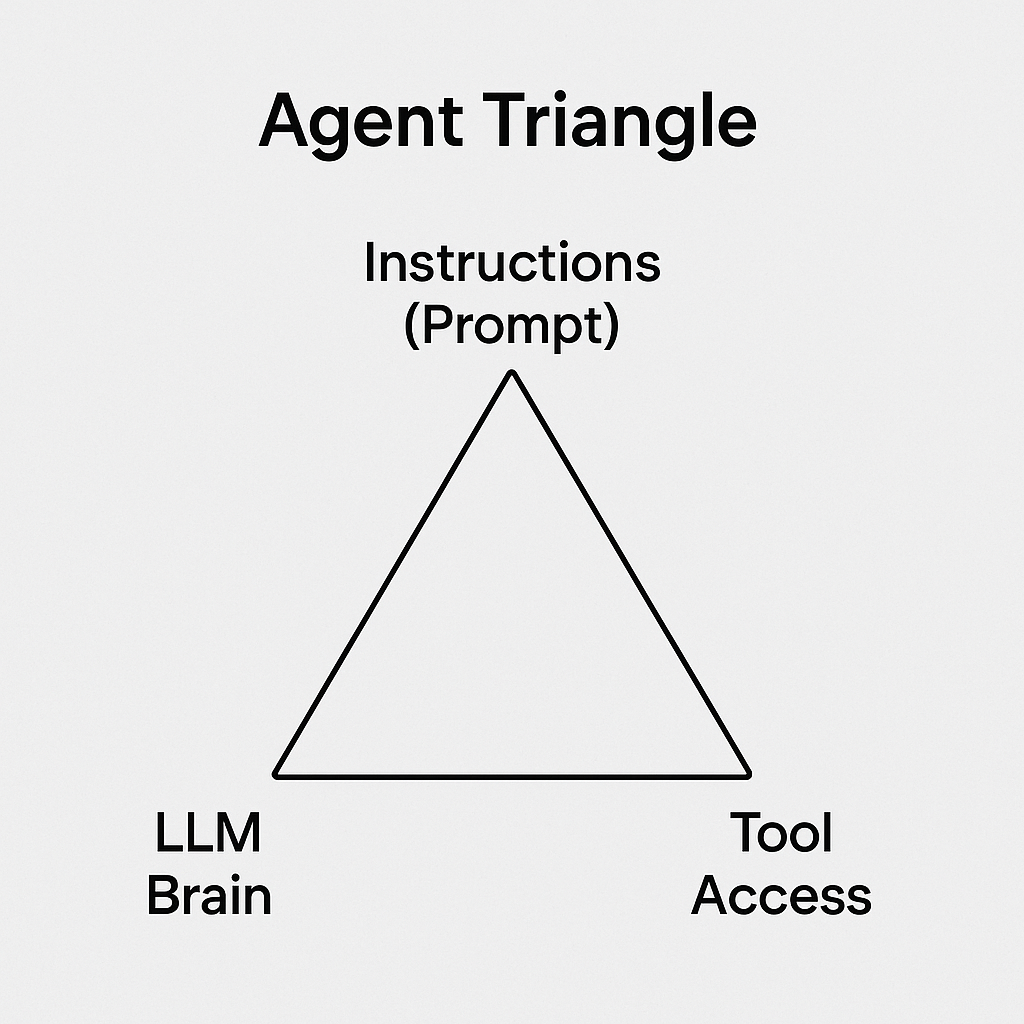
- Agents can be many things, and they're being hyped to do even more. But the simplest way I've found to understand them is to understand what goes into them in what I call the Agent Triangle.
- Three points of the triangle:
- Instructions (prompt) - essentially a prompt that defines what the agent is supposed to do (these text instructions are sent to the LLM like any prompt in a conversation with ChatGPT)
- LLM Brain - the reasoning engine of the agent
- Tool Access - a list of tools the agent can use (can also include other agents), enabling the autonomous behavior that defines true agents
- Agents must be integrated into a system to actually execute tools — they don't act alone.
Agentic space
- Refers to environments where agents interact with each other to accomplish tasks. This can be confined to a single system (e.g., within a company) or extend across the internet to engage with external agents and APIs.
- Agents can use both tools and predefined workflows. They can be prompted to:
- Follow a static workflow (a fixed series of steps)
- Or create a dynamic workflow on the fly — combining reasoning, tool use, and even invoking static workflows as part of a larger plan
Learning Loop: How to Really Learn GenAI
- Ask LLMs to teach you — they're good tutors, just don't trust them blindly
- Test them with false assumptions to find limits
- Ask: "Why didn't that work?" and "How would you fix it?"
- Make LLM use part of your daily routine - Pass all your emails through an LLM to see how it would modify them. It might not improve everything as you would like, but you'll be learning.
- Ask LLMs how to prompt → get results → ask why it didn't work → it can explain
What We Didn't Cover (And Why You Probably Don't Need It Yet)
While we focused on applying GenAI, which most of it as you can see can be mapped back to prompting there are other aspects of GenAI that don't map nicely. These typically fall out of applying GenAI and is less applicable for most users.
- Fine-tuning - Retraining models on your data. Most problems are solved with better prompting first.
- Model architecture - How transformers actually work under the hood. Interesting but not necessary for using GenAI effectively.
- RLHF & safety training - How models learn to be helpful and harmless. Important for AI safety researchers, less so for practitioners.
- Multimodal capabilities - Vision, audio, video. Follow the same principles as text once you understand the basics.
The pattern: if you're wondering whether you need these advanced concepts, focus on mastering prompting first. You'll know when you actually need to dig deeper.